Fleet Compliance & Intelligence Platform

Every inspection, audit and near miss — one system, one shared logic.

MarineKPI replaces the spreadsheets, email chains and disconnected checklists fleets use to track PSC, SIRE, RISQ, TMSA audits and statutory compliance — and layers AI on top of every one of them.

20Modules, one data model
4Built-in AI tools per record
1System — light on the ship, full on shore
0Spreadsheets required
The logic

One workflow, reused everywhere

Every audit and inspection module — PSC, SIRE, RISQ, all six TMSA practice audits, ISM, ISPS, MLC — runs through the same lifecycle. Learn it once on any module and you already know all twenty.

1

Capture, don't prescribe

MarineKPI records what your inspectors and officers actually observe and helps them analyze it — it doesn't hand your crew a generic checklist of how to run an inspection. The system adapts to how your fleet already works.

2

Ship raises, office closes

A consistent draft → issue → respond → close loop means every deficiency, finding or non-conformity has a clear owner and a visible trail — no more "did anyone action that PSC deficiency from March?"

3

Fleet-wide, then focused

Every module rolls up into cross-fleet analytics — repeat deficiencies, weak categories, vessels trending the wrong way — so your superintendents know exactly where to spend their next visit.

DraftPrivate to author
IssuedVisible fleet-wide
Open findingShip responds
RespondedOffice reviews
ClosedSigned off
🔒 Drafts are private to whoever wrote them — not even an admin sees another user's unfinished report until it's issued.
Unique to MarineKPI

An AI copilot built into every text box

This isn't a bolted-on chatbot. Four focused AI tools sit inside the actual forms your crew already fills in — turning rushed notes into clean, submittable records without leaving the page.

🌐

Translate

Crew write findings in Hinglish, mixed language or romanized script — the platform turns it into clear maritime English before it ever reaches the office.

On every finding field

Enhance

Rewrites rough field notes into professional audit language — without inventing facts, severities, or regulatory citations that weren't in the original text.

Fact-constrained by design
🏷️

Suggest

Reads the finding description and auto-classifies it against the module's real taxonomy — VIQ question, RISQ section, ISM category — then drafts the corrective action.

Matches your actual taxonomy
💬

Vessel Chat

A floating fleet-messages widget between ship and office, on every page, with automatic translation to each person's preferred language as messages arrive.

Fleet-wide, always on
🌐

Built for a fleet that doesn't think in English first

Most of what gets lost in a PSC or SIRE finding isn't the observation — it's an officer translating what they actually saw into English on the fly, under time pressure, in their second or third language. MarineKPI removes that barrier instead of demanding around it: an officer can describe a fire damper fault, a mooring incident or a near miss in Hindi, Tagalog, Mandarin, Russian or whatever mix of languages they think in, and the platform carries the meaning across — not just a word-for-word translation. The result is that a non-native English speaker's report reads exactly as clear and rigorous as anyone else's, and nothing gets softened, mistranslated or left out because someone wasn't confident writing it up in English.
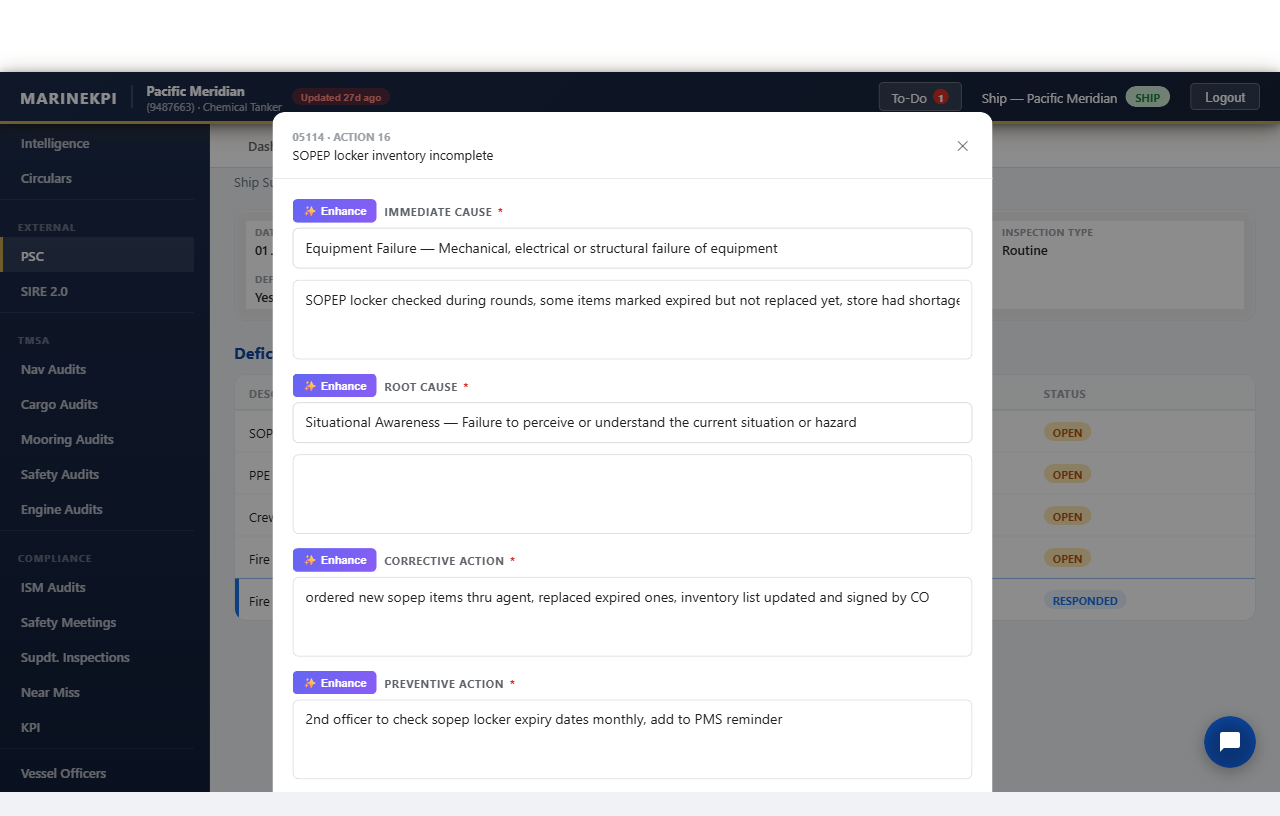
marinekpi.com — PSC deficiency, corrective action field
fire flap valve nahi close ho raha tha, greasing kiya aur spring badal diya, ab thik hai
↓ The real thing, captured live from the running app — not a mockup
marinekpi.com/psc-inspection — ship draft
Real deficiency response form with rough officer notes and Enhance buttons
Before — officer's rough notes, Enhance button visible on every field
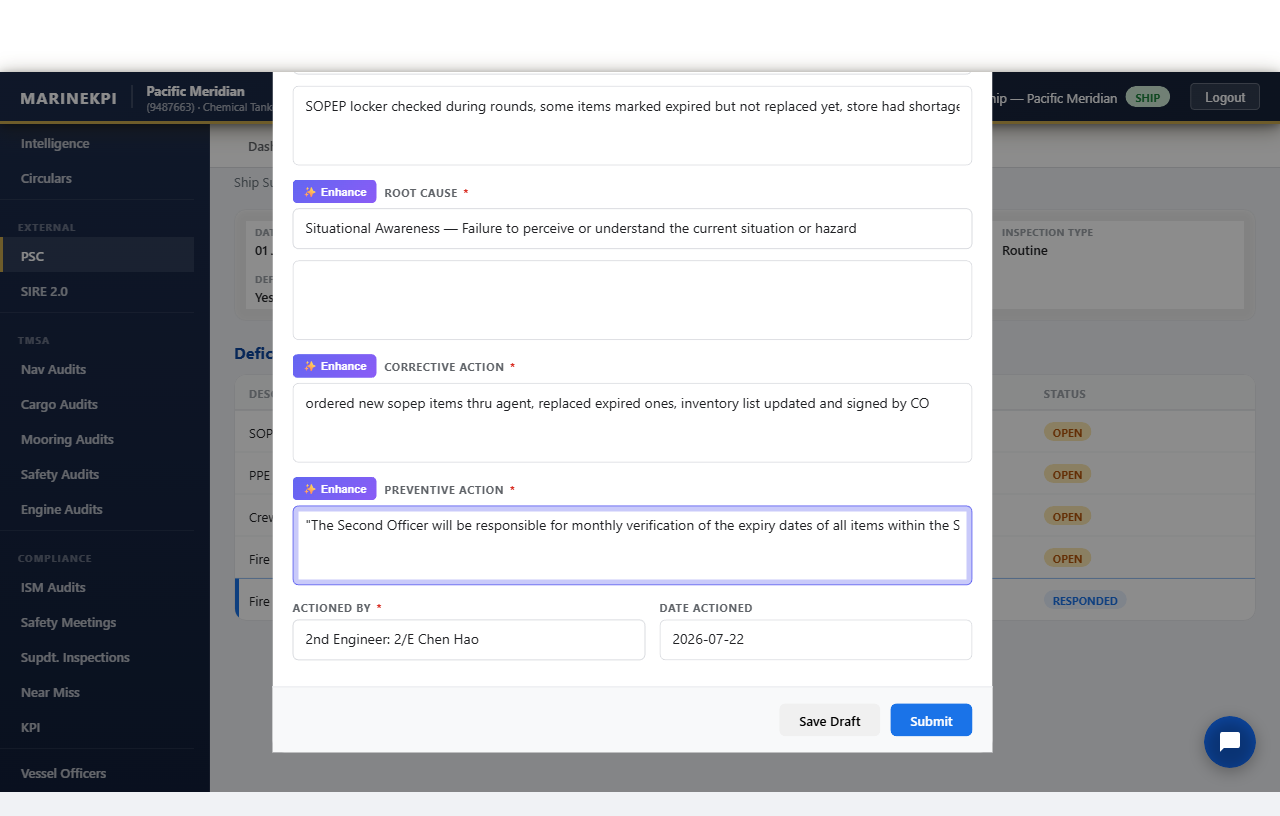
marinekpi.com/psc-inspection — after Enhance
Real AI-enhanced text highlighted in the preventive action field
After — one click, same facts, professional audit English
Explore the modules

Click into any part of the fleet

Start with a category, then drill into the module you care about. Use Back or the breadcrumbs to come out again — everything here mirrors the real app.

Access & security

Everyone sees exactly what they should

One login system, three roles, and company data that never crosses tenant boundaries — enforced at the database query, not just the UI.

Admin

Company-wide

Full access across their own company's fleet — every vessel, every module their company has enabled.

Office PIC

Assigned vessels

Person-in-charge view scoped to the specific vessels assigned to them — "My Fleet" analytics instead of the whole company.

Ship

Single vessel

Crew see their own vessel's data. On cross-fleet views like Intelligence, other vessels' identities are anonymized rather than hidden outright.

See it running on a real fleet

A 30-minute walkthrough covers the modules that matter to you — PSC and SIRE, TMSA audits, or the Pulse / MRM analytics layer — using your own inspection history if you'd like it loaded in.